
Help · For nurses and administrators
Care plans and assessments
A care plan tells every shift how to care for a resident, in plain words. Nurses and administrators write it; everyone on staff can read it.
When a plan is due
- The first care plan is due within 7 days of admission.
- Each plan is reviewed at least every 12 months, and sooner after a change in condition.
- Care plans in the menu lists every resident with where their plan stands: first care plan due or overdue, review soon (within 30 days), review overdue, or up to date. It also lists assessments due in the next 30 days.
Writing the first plan
- Open the resident and tap Care plan, then Create care plan.
- Choose when it takes effect. The review date is set 12 months later; bring it forward if the resident’s needs are likely to change.
- Note who took part, for example “resident, daughter Jane (substitute decision-maker), Nurse Nia”.
- Fill in the sections that apply, in plain words a new care aide would understand: bathing and dressing, moving and falls, eating and diet, toileting, medication support, communication, memory and behaviour, sleep, skin care, activities, safety, and the resident’s own goals and wishes. Leave a section empty if it doesn’t apply. MapSorix Care starts you off with the service plan needs from the resident’s profile.
- Tap Review and publish version 1, check the summary, and publish it.
Reviewing or changing a plan
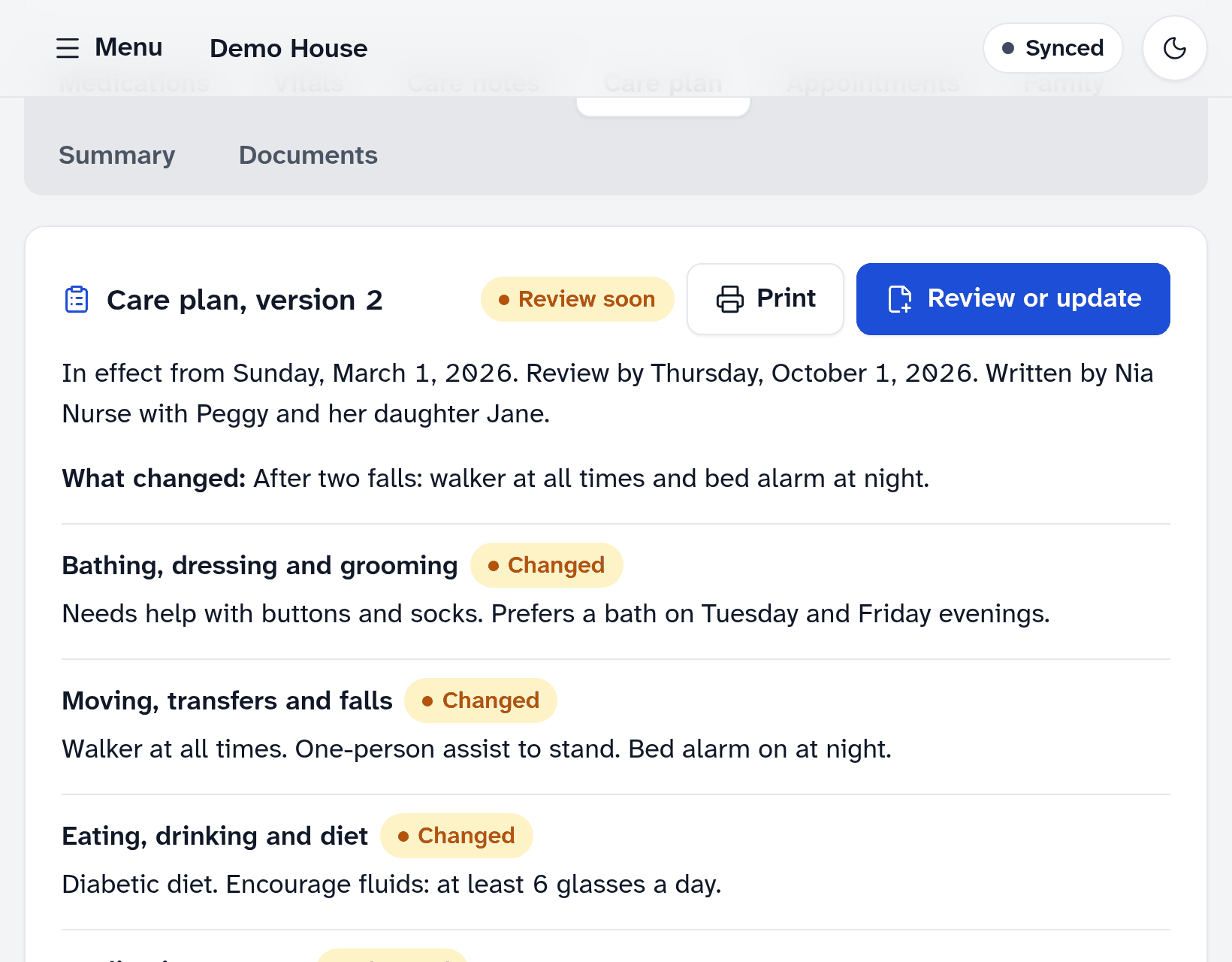
- On the resident’s Care plan, tap Review or update. The current plan is filled in for you.
- Change what needs changing, and say what changed, or “Reviewed, no changes”.
- Save and publish the new version.
A published plan can’t be edited. Each review or change is a new version, so the record shows what the plan said on any date. Sections that changed are marked Changed, and Versions lists every earlier one.
Assessments
Under the care plan, tap Record assessment. Choose the type: admission, annual review, change in condition, falls risk, skin and pressure injury risk, memory and thinking, nutrition and swallowing, pain, or other. Write what you found, the result if there is one, and when the next one is due.
Recorded one by mistake? Tap Entered in error and give the reason. It stays on the record, crossed out, with your name.
Good to know
- Tap Print for a paper copy of the current plan, for the resident’s chart or a hospital transfer. The print is recorded in the audit trail.
- Care aides read the plan on the resident’s Care plan tab. If something in it is out of date, they tell the nurse.
More help
- Signing in on a care tablet
- The medication pass
- Correcting a mistake
- Writing a care note
- When the internet drops
- Recording vital signs
- Filing an incident report
- Clocking in and out
- Care plans and assessments
- The family portal
- Your pharmacy and the pharmacy portal
- The pharmacy portal, for pharmacies
- Staff, tablets and support access
- Resident billing
- Getting ready for an inspection
All help · Questions: care@mapsorix.com or (306) 400-1800, Monday to Friday, 9 AM to 5 PM Saskatchewan time.